All users with a blazer ID and password can access the system through the UAB CME Portal.
Please Note: Attendee profiles were imported into the system from previous attendance records. If there are duplicate profiles associated with the same name, e.g. with both uab.edu and uabmc.edu address, we will need to merge those accounts into one. If you want to use single sign-on (i.e. Blazer ID and password) to access the system, please use your uab.edu email address.
If you encounter an error or see an issue with your profile, please notify us at cme@uab.edu and let us know which email address you intend to use to claim credit.
Access and Profile Update
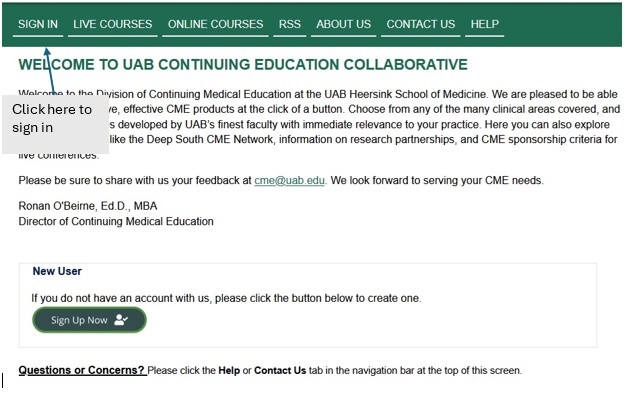
Click "Sign in" to access your account:
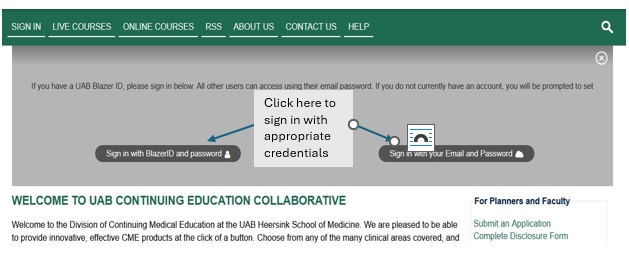
If you have a Blazer ID and password, select and you will be directed to a UAB-secured login page. If you have an external account, select "Sign in with your Email and Password":
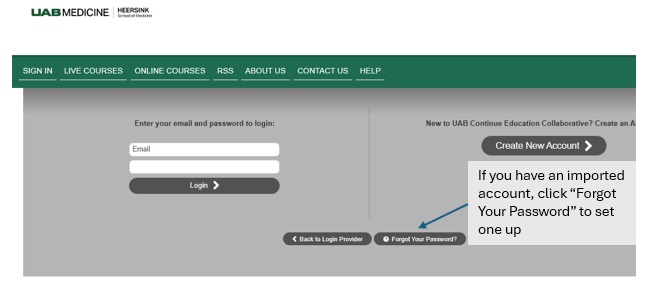
If you have previously completed a CME activity certified by the UAB Division of Continuing Medical Education, an account has been created when your record was imported. Select "Forgot Your Password"? to recreate your password.