Have you ever wondered how long it will take to walk to a cross-campus meeting? How to recognize an unfamiliar building from the street? Where to find a list of campus services or dining options across the university footprint?
A newly upgraded UAB Campus Map (uab.edu/campusmap) has added or surfaced a number of features to improve the user experience and help Blazers take advantage of all that our growing physical space has to offer.
Tyler Bryant, director of User Experience on the UAB Web team, developed the map upgrade with Programmer Analyst I Heather Godwin, who has developed the online Campus Map across several iterations over the years.
Here are their picks of the top new features:
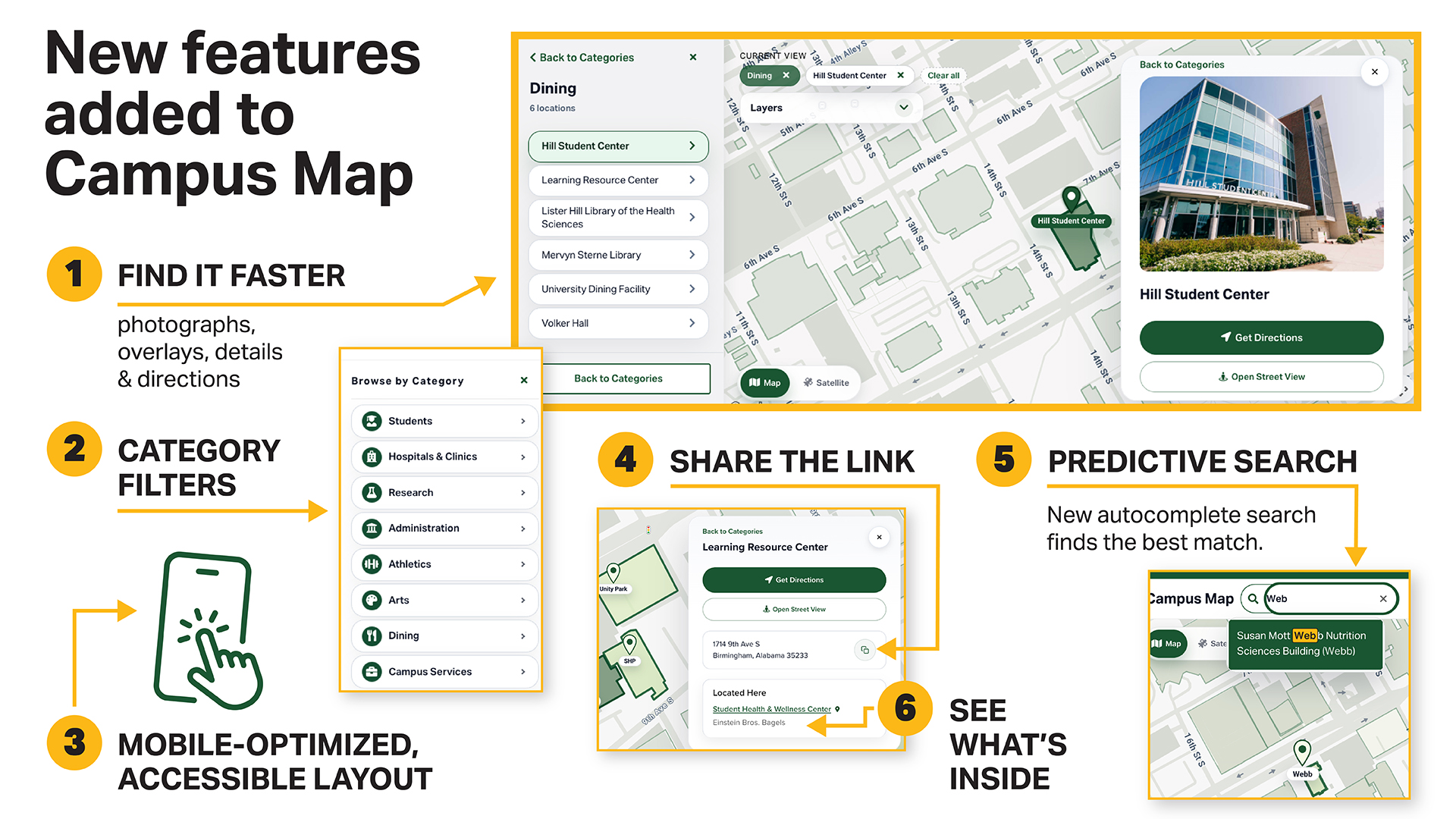
1. Find it faster
Several improvements have made it easier to identify UAB buildings and spaces:
- Major UAB buildings now include photographs in a detail panel, and any building photographed by Google has a Street View image displayed;
- a Get Directions button within the detail panel links directly to Google Maps navigation for driving or walking directions with travel time estimates — and you can copy a building’s address from the detail panel with one click to paste it into another navigation app;
- UAB-owned buildings now include outlines to distinguish them from nearby non-UAB buildings within the campus footprint; and
- student, employee and public/patient parking lots are color-coded with overlays.
2. Category filters
Click to select and highlight all buildings related to students, research, hospitals/clinics, dining, parking, campus services, administration and arts.
3. Mobile-optimized, accessible layout
The new fully responsive design includes touch-friendly panels and a collapsible sidebar when the map is viewed on mobile devices. The map also has full keyboard access for search, building lists and panels to meet WCAG 2.2 AA accessibility guidelines.
4. Share the link
Every building and category has its own bookmarkable URL for easy sharing — uab.edu/campusmap?heritage-hall, for example, or uab.edu/campusmap?athletics.
5. Predictive search
Not sure of a building’s name? The new autocomplete search scores results across building names, abbreviations, addresses and tenant/service names to find the best match.
6. See what's inside
Building details panels now include a “Located Here” section that lists services, restaurants and other tenants inside a building. Each is clickable to navigate to its own entry.
Coming soon: Accessible entrances and parking layer
A new overlay will show accessible entrance locations for buildings with cardinal directions and the nearest landmark to aid navigation.
Keeping the Campus Map updated requires constant changes as UAB adds new buildings and retires older facilities. Godwin works with the Geographic Information Systems team in UAB Facilities to keep track of the revisions. She creates custom shapes, built from a set of digital polygons, for the outlines of new buildings — adding these on top of the map’s base layer, which comes from Google Maps.
“It’s a big job, but Heather’s dedication and attention to detail have helped our Campus Map evolve to keep up with our campus changes and advances in technology,” Bryant said. “We are excited to roll it out and share this with the UAB community.”